Open up BES, then click on Servers you will see Blackberry EnterpriseServer Version. As shown in the image above, at the bottom of the list that starts with the status is the version of the BES server. In the case above, the BES server is running 4.1.6.10 ( a small install of BES with only 4 users currently).
Computer software support, reviews, and technology tips for troubleshooting and assistance.
Thursday, December 16, 2010
Friday, November 26, 2010
32 Bit HP BiDi Channel Components Installer
Product: 32 Bit HP BiDi Channel Components Installer -- The installer has encountered an unexpected error installing this package. This may indicate a problem with this package. The error code is 2753.
A solution to this problem that worked for me was to zero out the file(s):
hpzBDI32.msi
Create a file with 0 (zero) bytes in the C:\WINDOWS\system32\spool\drivers\w32x86 or any folder below this one containing the file. Rename the original .msi file and then name your zero byte file with the same name. To create a zro byte file do the following. Open notepad and and then save the file with any name. rename the original hpzBDI.msi file, you may have to stop the spooler to rename it, then copy the zero file into the directory and rename it to hpzBDI32.msi.
Thursday, December 31, 2009
Supporting Technology with Technology.: Enable 24 bit color in RDP for XP or 2003 Server
The default maximum color depth for rdp connections to windows 2003 server terminal servers or to windows XP desktops is 16 bits. Although in the drop down in the options sections of the rdp connection program there is true color 24 bit shown as one of the selection options, the connection is never made at 16 bits. That's because the remote XP desktop or windows 2003 server has a default limit of 16 bits. To connect with true color 24 bit rdp a change o nthe remote computer has to be made using group policy editor. This can be done for a whole domain by linking the the policy to a domain OU or per computer by using the local group policy editor. The images show how to change the the pre-defined default color limit on XP or windows 2003 server limits the color depth of RDP connections made to the the systems to a 16 bit maximum. How to configure the "server side" of remote desktop to accept connections at 24-bit true color. Windows 7, Vista, and server 2008 already allow higher that 24 bit color by default.
Tuesday, November 24, 2009
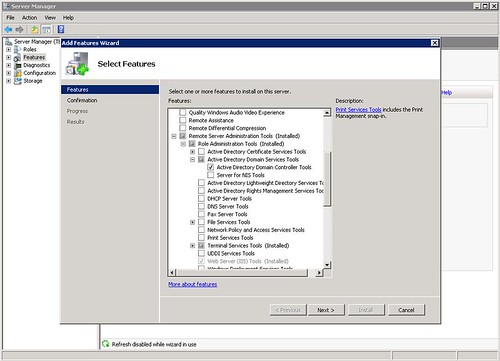
What happened to dsa.msc in 2008 windows server.
What happened to dsa.msc on windows 2008 server?A simple yet effective tool for admins and other tech support specialists that often had to access AD users and computers on the fly. Simply running this command on a windows 2003 member server would open the domain users and computers and allow changes and addition provided the user account with which it was run had sufficient access privileges.
In windows 2008 server this handy little feature is just that, a feature, and needs to be added separately. The image in this post shows which options to select to add the functionality back into the member server. If you used the command a lot then it's worth the several minutes to add it. It could wind up saving you server and user administration time in the long run and it doesn't require a restart. Just install and go.
Friday, October 23, 2009
Dell SAS 6/iR RAID Controller

Dell SAS6/iR Integrated SAS Controller Card Storage controller (RAID)- Serial ATA-300 / SAS- 300 MBps
This RAID controller card does not support RAID 5 or RAID 10. In fact it doesn't support any RAID configuration except for RAID 1 and RAID 0, that's it. It's a Plug-in card that's PCI Express x8 with 2 CH for PC and Unix. The Dell SAS6/iR integrated SAS controller card is designed to connect internal physical hard drives in workstations and servers. It's entry level and comes standard in the dell Poweredge r610 server. The SAS6/iR utilizes high performance SAS 3 Gbps technology to connect to the all the physical internal hard drives. It supports two internal x4 SAS connectors, each containing four ports for a total bandwidth of 12 Gbps, per connector. This card also supports for RAID levels 0 and 1 but not any RAID levels that are higher. It features integrated ARM I/O processor for processing all RAID 0 and RAID 1 operations. Up to 10 physical disks are supported by the integrated striping the SAS6/iR provides. The controller is incorporated with global hot spare feature, it can support a maximum of 2 global hot spares one for each virtual disk.
Desktop and server remote access support software
Wednesday, January 07, 2009
Consolidated HMC 4.5 Server List

There's no clustering of Exchange servers nor the SQL servers. Microsoft's Plan is much better than this. This is a watered down version as it is a consolidated incarnation of a well planned, thorough and developed solution from Microsoft. In addition, I am relying on the redundancy and failover achieved from the fact I am running all servers on a virtual platform.
Image below is from Microsoft's Deployement Walkthrough > Architecture
.gif)

Microsoft's Hosted Messaging and Collaboration 4.5 platform can be run in a consolidated fashion. Although there's no "official" document that outlines or details the steps involved to detract from the normal deployment. There is an unofficial guide to the HMC 4.0 deployment and that can be used as a basic deployment guide. Although there are differences between the two versions of the deployment and the references in the unofficial deployment document to the Microsoft TechNet doc are all broken, it can give you an outline of deployment.
I have to say that after using this method and indeed after taking making shortcuts to achieve a functioning hosted messaging system, it worked. The collaboration deployment I did not complete. It was required. I deployed only the exchange environment and this is working fine, including outlook anywhere and outlook web access . I'm using the sample provisioning tool and did encounter one awful message when deploying mailboxes for one of the organizations. I was able to create new accounts for the organization but cannot add mailboxes to new accounts. If a mailbox is removed for one of the existing users it cannot be re-added either. Other organization in the hosted environment are not having this problem.
Here's my consolidated server list for HMC 4.5 (10 servers,messaging only).
AD01
AD02
ExCAS01
ExCASOAB01
ExCASHUBEXT01
ExMBX01
ExMBXOAB01
ExUM01
FE01
MPSSQL01
There's no clustering of Exchange servers nor the SQL servers. Microsoft's Plan is much better than this. This is a watered down version as it is a consolidated incarnation of a well planned, thorough and developed solution from Microsoft. In addition, I am relying on the redundancy and failover achieved from the fact I am running all servers on a virtual platform.
Image below is from Microsoft's Deployement Walkthrough > Architecture
.gif)
Sunday, January 04, 2009
How to Uninstall Remove ePO Agent
How to remove the McAfee ePolicy Orchestrator Agent (EPO agent)

Uninstalling the ePO Agent v3 (Shield icon in system tray)
Open a command prompt and fo to the following product installation location:
C:\Program files\Network Associates\Common Framework\
Ten Run the followign command
FrmInst.exe /Remove=Agent

Other options include:
frminst /remove=agent
frminst /remove=updater
frminst /forceuninstall
Need to extract .rar compressed files but want the extra bells and wistles of winRAR?
Information and user opinion for using ExtractNow to Extract rar files without WinRAR can be found at this personal site.
Uninstalling the ePO Agent v3 (Shield icon in system tray)
Open a command prompt and fo to the following product installation location:
C:\Program files\Network Associates\Common Framework\
Ten Run the followign command
FrmInst.exe /Remove=Agent
Other options include:
frminst /remove=agent
frminst /remove=updater
frminst /forceuninstall
Need to extract .rar compressed files but want the extra bells and wistles of winRAR?
Information and user opinion for using ExtractNow to Extract rar files without WinRAR can be found at this personal site.
Subscribe to:
Posts (Atom)