Showing posts with label server. Show all posts

Thursday, December 16, 2010

Determine find BES server version blackberry server version


Open up BES, then click on Servers you will see Blackberry EnterpriseServer Version. As shown in the image above, at the bottom of the list that starts with the status is the version of the BES server. In the case above, the BES server is running 4.1.6.10 ( a small install of BES with only 4 users currently).

Tuesday, November 24, 2009

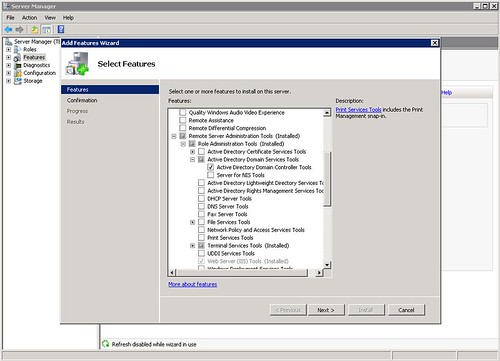
What happened to dsa.msc in 2008 windows server.

What happened to dsa.msc on windows 2008 server?

A simple yet effective tool for admins and other tech support specialists that often had to access AD users and computers on the fly. Simply running this command on a windows 2003 member server would open the domain users and computers and allow changes and addition provided the user account with which it was run had sufficient access privileges.

In windows 2008 server this handy little feature is just that, a feature, and needs to be added separately. The image in this post shows which options to select to add the functionality back into the member server. If you used the command a lot then it's worth the several minutes to add it. It could wind up saving you server and user administration time in the long run and it doesn't require a restart. Just install and go.

Wednesday, January 07, 2009

Consolidated HMC 4.5 Server List

Consolidated HMC 4.5 Server List


Microsoft's Hosted Messaging and Collaboration 4.5 platform can be run in a consolidated fashion. Although there's no "official" document that outlines or details the steps involved to detract from the normal deployment. There is an unofficial guide to the HMC 4.0 deployment and that can be used as a basic deployment guide. Although there are differences between the two versions of the deployment and the references in the unofficial deployment document to the Microsoft TechNet doc are all broken, it can give you an outline of deployment.


I have to say that after using this method and indeed after taking making shortcuts to achieve a functioning hosted messaging system, it worked. The collaboration deployment I did not complete. It was required. I deployed only the exchange environment and this is working fine, including outlook anywhere and outlook web access . I'm using the sample provisioning tool and did encounter one awful message when deploying mailboxes for one of the organizations. I was able to create new accounts for the organization but cannot add mailboxes to new accounts. If a mailbox is removed for one of the existing users it cannot be re-added either. Other organization in the hosted environment are not having this problem.


Here's my consolidated server list for HMC 4.5 (10 servers,messaging only).


AD01
AD02
ExCAS01
ExCASOAB01
ExCASHUBEXT01
ExMBX01
ExMBXOAB01
ExUM01
FE01
MPSSQL01


There's no clustering of Exchange servers nor the SQL servers. Microsoft's Plan is much better than this. This is a watered down version as it is a consolidated incarnation of a well planned, thorough and developed solution from Microsoft. In addition, I am relying on the redundancy and failover achieved from the fact I am running all servers on a virtual platform.

Image below is from Microsoft's Deployement Walkthrough > Architecture


Tuesday, May 06, 2008

Information Technology Support - Adventure (Rated PG): Computer Desktop and Server Management


More than remote control software, Kaseya has some excellent features that aer unparralelled. They have a complete solution for desktop and server management that doesn;t stop at just the desktops or servers. They have a crossplatform support for PC and MACs and can also monitor any SMTP enabled device to alert of a problem before a customer for whom you are monitoring would even know. It has a backup and disaster recover component that allows you to create offisite backups of your customer';s most important computers and servers based on the best imaging software, Acronis.

In addition to remote control through a silently installed agent on the remote computers and servers, their is a very robust and complete ticket system and help desk.

Main features inlcude:


  • PC Remote Control/Remote Support

  • Patch Management

  • Kaseya Computer Audit and Discovery

  • Remote Desktop Management

  • LAN and Windows Monitoring

  • Help Desk and Trouble Ticketing

  • Software Deployment & Systems Management

  • Network Policy Management

  • Backup and Disaster Recovery

  • Anti-Virus/Anti-Spyware Detection

  • Cross Platform Support (PC and MAC)

  • User State Management
  • Power Management


Visit their site for complete information at kaseya.com