Tuesday, March 05, 2024

PowerShell to Identify the Azure AD Connect server (Microsoft Entra AD Connect) PowerShell Command line.


Local PowerShell command to show the Azure Microsfot Entra Connect sync server's name. 

Find Azure Entra Sync Server Command Line

This one liner PowerShell command, although long, worked perfectly to list current Microsoft Entra Connect server and it also listed all previous AD connect sync servers. Didn't need past servers but it displayed them but I suspect that information could be useful for another problem so it's good to know that information could be obtained with the same command.  The PowerShell command to list Azure Entra Connect sync servers doesn't list DirSync servers.  


Get-ADUser -LDAPFilter "(description=*configured to synchronize to tenant*)" -Properties description | % { $_.description.SubString(142, $_.description.IndexOf(" ", 142) - 142)}


The command mentioned above is actually used in the scenario shown below to find out or validate the on-premises server Microsoft Entra Azure AD service was operating on. Also, the command includes a list of all previous servers. These servers were visible in Active Directory but were not indented to display history. This was a pleasant surprise, but we only required the current server. 


Please share.  use the share icons below or at the bottom of this page. Thank you. 


Sunday, March 03, 2024

How to Leave Slack Workspace

 How to Remove Your Account from a Slack Workspace 

leave slack Workspace - remove account from slack WorkSpace
Remote your account from Slack Workspace


Old version instruction may not be very useful when trying to remove your account from a Slack workspace.  You may have added your account into a Slack workspace by accident and need to leave that Slack works space. Many steps simply indicate to select the Workspace and delete leave the space. Some indicate to leave all channels then leave the works space.  

With the latest version of Slack as o the date of this post and possibly near future releases, the way I found to leave or delete your account from a Slack channel is to open a browser, log into Slack. 


Go to Account > Deactivate Account > Click or Tap "Deactivate Account" button.


Wednesday, January 17, 2024

RDP (Remote Desktop) Manager Provides Central Access of RDP Connections.

RDP (remote desktop) management benefits both Administrators and General Desktop Users
Both users and administrators share in the benefits. 

Central place to access RDP connections. 

RDP (Remote Desktop Protocol) manager is a highly beneficial tool that enables users and administrators to streamline their workflow by providing a centralized platform to access all their remote desktop connections. This application proves to be indispensable for professionals who frequently need to remotely access different machines or servers. By offering a comprehensive view of all RDP connections in one place, this manager enhances efficiency, organization, and ease of access. Users can effortlessly add, modify, or remove remote desktop connections, eliminating the need to manually search for each connection separately. Additionally, RDP manager allows admins to store and manage credentials securely, ensuring sensitive information remains protected. With its intuitive interface and advanced features like group management and custom settings configurations, RDP manager facilitates seamless navigation through multiple remote desktop sessions with utmost convenience and control. Empowering professionals with the ability to efficiently handle remote connections from one central hub, RDP manager significantly simplifies the way individuals interact with different systems remotely.  

Guide to Using Microsoft Remote Desktop on a Windows 11 

List RDP (Remote Desktop) connections without a file server or network shares. 

Furthermore, the remote desktop feature allows users to collaborate effectively with colleagues and clients, regardless of their physical location. This not only saves time and resources spent on travel but also promotes a flexible work environment. Additionally, the encrypted connections ensure that sensitive data remains protected from unauthorized access, giving organizations peace of mind when it comes to data security. With the List RDP connections feature, users can easily manage and monitor their remote sessions, further enhancing productivity and efficiency.

Furthermore, the flexibility offered by remote desktop connections allows employees to work from anywhere, whether it's from the comfort of their homes or while on a business trip. This not only increases work-life balance but also enables companies to tap into a global talent pool without geographical limitations. Moreover, the centralized nature of remote desktop connections simplifies IT management, as software updates and security patches can be easily deployed to all connected devices, ensuring a consistent and secure computing environment.

Manage list of shared RDP connections for users without requiring file server shares. 

In order to efficiently maintain a list of shared Remote Desktop Protocol (RDP) connections for users without the need for file server shares, organizations can opt for centralized solutions such as using a dedicated RDP management tool. The best approach is to use an online service for listing RDP (remote desktop) connections particularly those that don't require a management console or other software to be installed locally.  Creation and access of RDP connection is done through a browser-based UI.  This software enables administrators to establish and manage a structured repository of RDP connections accessible to authorized users, eliminating the need for traditional file server shares. By implementing this approach, organizations can ensure secure access to RDP connections while maintaining control over user permissions and privileges. Additionally, administrators can conveniently update and modify the list of shared RDP connections from a central location, streamlining the management process. This not only enhances productivity but also strengthens security measures by reducing potential vulnerabilities associated with traditional file server sharing methods. Ultimately, employing a dedicated RDP management tool offers businesses an efficient and secure solution for maintaining and managing shared RDP connections within their network infrastructure.


How to Enable (RDP) Remote Desktop Service Using Regedit

Setup and Access Microsoft Remote Desktop on a Windows 11 Computer: A Comprehensive Tutorial

RDP First introduced by Microsoft with Windows NT Server 4.0 Terminal Server Edition - Microsoft Release Announcement. 


Wednesday, June 15, 2022

Azure AD Sync Server Manual Sync of AD to Azure

 Azure AD Sync Server Manual Sync of AD to Azure


manual azure sync

 Manually Syn Local AD to Azure faster

Syncing to Azure can be seeming slow particularly when your in a hurry to get object updates and additions to Azure.  Passwords resets for users are sent nearly immediately however other changes to Active Directory objects are not so fast to sync. They can take 30 minutes or longer. Sometimes a little less because the next cycle is already less than 30 minutes. 

Other factors can lead to slow Azure Connect software and server sync times. If there are issues with the local domain controllers then that will result in slower times. I have seen that occur where local replication problems with slow replication from the Azure ad connect server to azure. it is best to fix those issues sooner rather than later. Issues such as slow syncing or active directory problems can often be resolved using software for remote access. Software for online desktop support is such software that permits access and control to a remote computer . Once access is achieved, the desktop or server become the jump point to another network devices and servers. The online desktop support software could also connect directly to the Sync server. 

So connect to a domain controller or the server that';s running the Azure AD connect services then RDP to a domain controller. On the domain controller open and elevated command prompt and run the following command to replicate any recent AD changes to all the domain controller in the domain and forest. 

C:\>  repadmin /syncall /APeD 

On the Azure Sync server open an elevated Powershell Prompt and run the following command as shown in the screen capture o sync new objects or update properties in AD of existing objects. 

C:\> Start-ADSyncSyncCycle -PolicyType Delta 


Thursday, May 05, 2022

Disable Windows Server 2019/2016/2022 Auto Lock, Screen Lock


Disable Windows Server 2022/2019/2016/2012 Auto Lock, Screen Lock


Disabling auto screen lock in Windows Server can be done without using a domain group policy. Only the local computer policy is required so this won't have to be applied to other servers. 

Start by opening local group policy. Click search or the windows icon on the taskbar then begin typing Group and select Edit Group Policy . That will start the right console. 


Disable Windows Server  Auto-Lock, Screen Lock


Now you can edit the local policy - NOT the domain policy 


Go to System | Power Management | Video and Display Settings | double click on Turn off the display (plugged in) setting


Enable it, set to 0. 


Open an elevated command prompt and run gpupdate /force. Running this command is really not required for a local policy but a good habit to get into if you will also be creating or editing Active Directory Group Policies. 

That's it. It has worked for me every time. This may also work for Windows 10 and Windows 11 but I've not tested yet. 


Share/Save/Bookmark


Enhance your Support Services with Online Desktop Support Software. Already have a remote access solution, get that first connection to install your agent, add this Online Remote Support Software service to get initial remote access.  


Friday, April 29, 2022

Enable BASH Shell vCenter 6.5 , 6.x


      Enable BASH Shell vCenter 6.5 , 6.x


Share/Save/Bookmark


 You may encounter after logging into the console of a vcenter appliance either through vmware console or using putty or other SSH client tool, bash is disable. 

Quickest fix if you have reached the point of logging into and have the small menu of options that includes List APIs, List Plugins, Launch BASH is to run a command to enable BASH shell. 

On the surface, it looks like you can't enter any command but indeed you can. 

Enter at the prompt Command>  shell.set --enabled true  

This enables BASH shell for vcenter, then type in shell as you would normally and the BASH shell loads for you. 


Provide improved  remote technical support to clients and users, even family and friends.  Software for online desktop support can help businesses of all sizes improve response times. Get access to problem computers desktops over the internet using desktop screen sharing software. Remote control access software that enables connections to remote computers. Online desktop support software doesn't require pre-installation and doesn't require special environment plug-ins such as .NET framework. It works with all popular browsers. No browser extensions or plugins needed. 


Saturday, February 14, 2015

Command Line for Finding Dell Service Tag or HP Serial

Command Line to Display Dell Server or Desktop Service Tag 


A Dell server or desktop service tag can be found by using a command line and no additional tools installed. This is achieved simply through a common Windows command window. The command line works on Windows XP and above. Dell BCM utilities other other third party software does not need to be installed. The functionality to retrieve and display the service tag, serial number, and other information is built into Windows.  
On an HP system (server or desktop), the system serial number can be retrieved and displayed very quickly by starting a command prompt and typing in : 
 WMIC BIOS GET SERIALNUMBER  (the command can be upper or lower case).  

On  Dell server or Desktop/laptop system,  the same command line will display the service tag. 


Getting the serial number of a "white-box" system using command line

Without third party utilities installed on  a "white-box" system, the serial number could be displayed using the same command used for displaying the serial number and service tag. The serial number will be if the manufacturer has entered into the property field which is queried when the command is executed. Commonly however, when trying to acquire the serial number using Windows Management the results "To Be Filled by O.E.M." . 


Command on Linux to get the Dell service tag or HP serial number

Linux of course has the ability to return the manufacturers serial number or a Dell service tag. On CentOS or Red Hat Linux for example, the following utility run from a command window (shell) can be executed to display the system serial number or service tag.

dmidecode Command to display Dell Service Tag or system serial number on Linux

      # dmidecode | grep -i serial      
or 
      # dmidecode -t 1

 DMIDECODE may have to be installed first if not available. 
The utility can be installed by executing the following: 
       
# yum -y install dmidecode


Share/Save/Bookmark
Enhance your Support Services with Online Desktop Support Software. 


Thursday, September 04, 2014

Fake eFax Email Message eFax Virus Alert

Fake eFax email notification of new Fax. 

 eFax Email Message Scam

With so many scams on the internet coming in the form of email. The two most common are emails with attached files, and the second most common is emails that look to be from legitimate sources but are spoofed (faked" to look real. They are from real legitimate companies doing real business and providing real services. The most common of those are conceived to look like email communications from banks. Since many people have become more savvy, the use of the fake bank emails has become less popular for the spammers and scammers. They use other methods such as the case of eFax, or documents sent from multi-function copier/scanners which we all have in our offices today capable of sending scanned documents to email. The subject will contain Xerox or Sharp or other well known manufactures of scanner/copiers as in many cases those subjects are part of the defaults of the configuration for the scanner/copier.
The image in this post depicts one of those such scams. It looks like a real eFax notification and contains no attachments, just links.

eFax Virus Alert Fake eFax Email

Clicking on one of those links will bring you to a web site that is not of course from eFax but instead a site that will contain malicious code in its pages. That code will attempt to add malware or some other malicious code to your computer and surely compromise your data and at times the integrity of your network. Another common fake email notification has been from shipping carriers like UPS.
Once of the best ways to check for yourself to determine if the email is a scam and the links are fake is to hover your mouse cursor over the link. Hovering the mouse over the link will show the URL - the site that you will connect to if you click on the link. Depending on browser version, you will be notified of the potential risk and will be required to "approve" continuing to the site. Chrome does this kind of check for bad sites.

eFax Corporate Fax Message Fake with Malicious Links

Warn your users about this eFax Virus Email 

Undoubtedly there will be unknowing individuals who will click on the links within this fake eFax fax message email notification. They will get a virus or two on their systems and perhaps a stealth Trojan that will haunt them, slow down their computer, or even worse hold their files for ransom. The message looks very real and only if you are somewhat knowledgeable or have excellent protection already installed on your system, the bad guys will get them. One point to note, as stated above, Chrome will warn the user and that will help prevent some of the spread of this fake eFax message containing viruses and malicious intent. Having Chrome installed is not enough, it has to be the default browser on the system in use. The link is clicked from within the fake eFax Virus email, the default browser opens and connects to the web site.

Share/Save/Bookmark


Enhance your Support Services with Online Desktop Support Software.  Support desktops and servers such as fax servers remotely with desktop screen-sharing remote control and desktop computer remote access online through the web.   On-demand online remote desktop support software for fast access to remote desktops. 


Monday, December 30, 2013

Start or Restart vCloud Director Service from Linux command line


After installing VMware vCloud Director 5.5, you are given an option to start the service immediately.  However, if you decide not to start the service at this time as in perhaps you are prepping more than one vCloud Director server, then you can start the cloud director service at a later time and it can be done manually.
vCloud Director runs on Linux; redhat, centos. The command line to start the vcloud director service is the same.

The command to start the vCloud Director service is :


      service vmware-vcd start 

The command to stop the vCloud Director service is :

      
       service vmware-vcd stop 


Saturday, November 26, 2011

501 Header Values Specify a Method That is Not Implemented - activesync test

501 Header Values Specify a Method That is Not Implemented


Share/Save/Bookmark

It is possible to test activesync connectivity and availability on an Exchange 2007 or 2010 server without a smartphone. The FASTEST way to test for access to activesync on an Exchange server without a smartphone is to enter the the activesync URL into your browser's address bar and connect to it. The message you receive will look like the one in this post but that is NORMAL. The reason we get that message, as erroneous as it looks, it because it's a browser not a smartphone. The smartphone not only connects to the activesync URL but it also passes login information which we do not when manually entering the URL address into our browser.

The URL to test activesync on an exchange 2007 or 2010 server without a smartphone is :

https: //yourdoamin.com/Microsoft-Activesync-Server.

The the text in the URL is CaSe sensitive.

501 header values specify a method that is not implemented. When receiving this "erroLinkr" message during an active sync test without a smartphone, it is normal. Test activesync using a URL from a computer via a browser.

This page is normal for when connecting to an exchange 2007 server with SP1 or Exchange 2010 using a browser with the active sync URL as the address. The message between Exchange 2007 and Exchange 2010 differs much because of the differences in the IIS versions. It's only an appearance difference for an exchange 2007 server on windows 2003 or windows 2008 server .

Also, on different Windows Server versions, for example Windows 2003 Server the IIS version differs enough and the error codes also different so that's what's going to generate a different looking 501 error in the browser. with Microsoft Exchange 2007 on Microsoft Windows 2003, the message reads 501/505 not implemented or not supported. The image above is Microsoft Exchange 2007 on windows server 2008. Microsoft Exchange 2010 on Windows 2008 or 2008 R2 will be the same because remember, it's IIS that's actually presenting the error code and page to the browser not Exchange.

http://www.blogger.com/img/blank.gif http://onlineremotesupportsoftware.blogspot.com/ http://www.blogger.com/img/blank.gif 
501 Header values specify a method that is not implemented


Enhance and Improve your Support Service
Provide improved  remote technical support to clients and users, even family and friends.  Whether you're  a member of a large MSP network operations center team or a single  person business servicing and accessing desktops from a small office or home office, 4RemoteSupport software for online desktop support  improves service levels for all business sizes.  It is common for MSP and  individual IT support service providers to provide remote desktop access support utilizing multiple desktop screen sharing software. Remote control access software that requires software such as an  agent installed on the remote desktops for  future re-connections tend to cost more than online desktop support software used only when required.  remote desktop software that's agent based, requires installation and leaves a service running. These types of online desktop support software services usually incurs a charge per each remote desktop. Non-agent remote desktop client applications  permits online remote desktop connections when needed and connections are usually initiated by the user on the remote desktop. Most providers will have and use both types support tools appropriate for different scenarios. 4RemoteSupport online desktop support software does not require pre-installation nor require plugin software or framework services like .NET preinstalled. It works with all popular browsers. No browser extensions or plugins needed. 


Friday, September 16, 2011

Configure SSH on ESXi 4.0 Host

Steps to configure SSH on ESXi 4.0 Host.

From the main screen on the ESXi host press Alt + F1.

At the next screen type:

unsupported

and enter the root password when prompted.

Use a text editor to uncomment (remove the hash symbol #) from the beggining of the following line in the file /etc/inetd.conf. Then save the changes:
# ssh stream tcp nowait root /sbin/dropbearmulti dropbear -l

Resatrt the process called inetd by running:

#cat /var/run/inetd.pid
#kill -HUP


Verify the ESXi host is accessible by SSH. To do this from the SSH client, log into the ESX host:

~ # dbclient root@server
The output will be similar to:

Thursday, December 16, 2010

Determine find BES server version blackberry server version


Open up BES, then click on Servers you will see Blackberry EnterpriseServer Version. As shown in the image above, at the bottom of the list that starts with the status is the version of the BES server. In the case above, the BES server is running 4.1.6.10 ( a small install of BES with only 4 users currently).

Friday, November 26, 2010

32 Bit HP BiDi Channel Components Installer


Product: 32 Bit HP BiDi Channel Components Installer -- The installer has encountered an unexpected error installing this package. This may indicate a problem with this package. The error code is 2753.
Everytime a user logged into a Citrix server with a specific HP printer, in this case it was a 2420, the msiexec process would run and generate and log an error in the evnt log of the server. The error would indicate the microsoft installer ran and could not complete with an error. Now, having the istaller run for every user that logs into a Citrix server consumes resources and make the login process, at least the printer creation portion, much slower.
A solution to this problem that worked for me was to zero out the file(s):
hpzBDI32.msi
Create a file with 0 (zero) bytes in the C:\WINDOWS\system32\spool\drivers\w32x86 or any folder below this one containing the file. Rename the original .msi file and then name your zero byte file with the same name. To create a zro byte file do the following. Open notepad and and then save the file with any name. rename the original hpzBDI.msi file, you may have to stop the spooler to rename it, then copy the zero file into the directory and rename it to hpzBDI32.msi.

Thursday, December 31, 2009

Supporting Technology with Technology.: Enable 24 bit color in RDP for XP or 2003 Server


Supporting Technology with Technology.: Enable 24 bit color in RDP for XP or 2003 Server

The default maximum color depth for rdp connections to windows 2003 server terminal servers or to windows XP desktops is 16 bits. Although in the drop down in the options sections of the rdp connection program there is true color 24 bit shown as one of the selection options, the connection is never made at 16 bits. That's because the remote XP desktop or windows 2003 server has a default limit of 16 bits. To connect with true color 24 bit rdp a change o nthe remote computer has to be made using group policy editor. This can be done for a whole domain by linking the the policy to a domain OU or per computer by using the local group policy editor. The images show how to change the the pre-defined default color limit on XP or windows 2003 server limits the color depth of RDP connections made to the the systems to a 16 bit maximum. How to configure the "server side" of remote desktop to accept connections at 24-bit true color. Windows 7, Vista, and server 2008 already allow higher that 24 bit color by default.

Tuesday, November 24, 2009

What happened to dsa.msc in 2008 windows server.

What happened to dsa.msc on windows 2008 server?

A simple yet effective tool for admins and other tech support specialists that often had to access AD users and computers on the fly. Simply running this command on a windows 2003 member server would open the domain users and computers and allow changes and addition provided the user account with which it was run had sufficient access privileges.

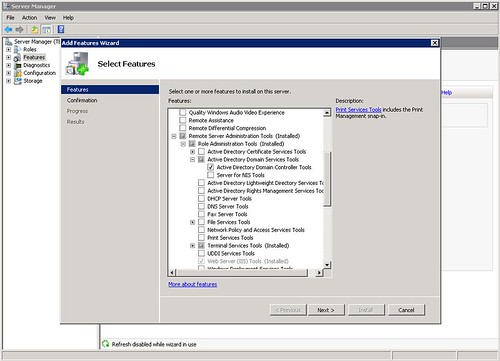
In windows 2008 server this handy little feature is just that, a feature, and needs to be added separately. The image in this post shows which options to select to add the functionality back into the member server. If you used the command a lot then it's worth the several minutes to add it. It could wind up saving you server and user administration time in the long run and it doesn't require a restart. Just install and go.

Friday, October 23, 2009

Dell SAS 6/iR RAID Controller


Dell SAS6/iR Integrated SAS Controller Card Storage controller (RAID)- Serial ATA-300 / SAS- 300 MBps

This RAID controller card does not support RAID 5 or RAID 10. In fact it doesn't support any RAID configuration except for RAID 1 and RAID 0, that's it. It's a Plug-in card that's PCI Express x8 with 2 CH for PC and Unix. The Dell SAS6/iR integrated SAS controller card is designed to connect internal physical hard drives in workstations and servers. It's entry level and comes standard in the dell Poweredge r610 server. The SAS6/iR utilizes high performance SAS 3 Gbps technology to connect to the all the physical internal hard drives. It supports two internal x4 SAS connectors, each containing four ports for a total bandwidth of 12 Gbps, per connector. This card also supports for RAID levels 0 and 1 but not any RAID levels that are higher. It features integrated ARM I/O processor for processing all RAID 0 and RAID 1 operations. Up to 10 physical disks are supported by the integrated striping the SAS6/iR provides. The controller is incorporated with global hot spare feature, it can support a maximum of 2 global hot spares one for each virtual disk.


Dell Storage Controllers

Desktop and server remote access support software

Wednesday, January 07, 2009

Consolidated HMC 4.5 Server List

Consolidated HMC 4.5 Server List


Microsoft's Hosted Messaging and Collaboration 4.5 platform can be run in a consolidated fashion. Although there's no "official" document that outlines or details the steps involved to detract from the normal deployment. There is an unofficial guide to the HMC 4.0 deployment and that can be used as a basic deployment guide. Although there are differences between the two versions of the deployment and the references in the unofficial deployment document to the Microsoft TechNet doc are all broken, it can give you an outline of deployment.


I have to say that after using this method and indeed after taking making shortcuts to achieve a functioning hosted messaging system, it worked. The collaboration deployment I did not complete. It was required. I deployed only the exchange environment and this is working fine, including outlook anywhere and outlook web access . I'm using the sample provisioning tool and did encounter one awful message when deploying mailboxes for one of the organizations. I was able to create new accounts for the organization but cannot add mailboxes to new accounts. If a mailbox is removed for one of the existing users it cannot be re-added either. Other organization in the hosted environment are not having this problem.


Here's my consolidated server list for HMC 4.5 (10 servers,messaging only).


AD01
AD02
ExCAS01
ExCASOAB01
ExCASHUBEXT01
ExMBX01
ExMBXOAB01
ExUM01
FE01
MPSSQL01


There's no clustering of Exchange servers nor the SQL servers. Microsoft's Plan is much better than this. This is a watered down version as it is a consolidated incarnation of a well planned, thorough and developed solution from Microsoft. In addition, I am relying on the redundancy and failover achieved from the fact I am running all servers on a virtual platform.

Image below is from Microsoft's Deployement Walkthrough > Architecture


Sunday, January 04, 2009

How to Uninstall Remove ePO Agent

How to remove the McAfee ePolicy Orchestrator Agent (EPO agent)


Uninstalling the ePO Agent v3 (Shield icon in system tray)
Open a command prompt and fo to the following product installation location:
C:\Program files\Network Associates\Common Framework\
Ten Run the followign command
FrmInst.exe /Remove=Agent


Other options include:
frminst /remove=agent
frminst /remove=updater
frminst /forceuninstall


Need to extract .rar compressed files but want the extra bells and wistles of winRAR?
Information and user opinion for using ExtractNow to Extract rar files without WinRAR can be found at this personal site.

Tuesday, October 21, 2008

HP Online Desktop Diagnostic Memory Test


HP On-Line Diagnostic - Model HP Compaq dc5100 SFF Memory


This is one of the things that I prefer and like that HP does that at least recently I've not seen from Dell. The fact that I could run a memory test, and not just a status test, while a computer was still in Windows XP.

With Dell, I had to take the system off-line and then run a deep memory scan. With HP's online diagnostics memory test, I was able to keep the desktop system online.


This particualr desktop however, had no memory errors. the computer was acting very erratic. It would freeze, applications would hang, and the time of these accurances was random almost like a memory problem but without blue screens or hard stop errors. The applications and computer would just hang, requiring a hard reboot. This is also a symtom of a tempurature problem. I found this nice little program very handy for checking on the system fans and the tempurature of the desktop.


A nice little freeware product that's a nice little addition to the toolbox is called SpeedFan. Besides the memory test, I installed and ran SpeedFan and it really helped with the problem. It showed the sensores installed on the motherboard and their individual RPM speeds. It also showed the current temperatures of the sensors and not surprisingly, there was an image of flames on one of them and another fan with 0 RPM - it was not spinning at all.


Monday, September 22, 2008

A Simple Program to Extract .rar Archives.


ExtractNow is a handy little program that needs to get noticed. If you hate having to install software on your computer that you really don;t use often and really don;t want because of the changes that it's going to make to your system then this is the program if for you for extracting files from rar archives quickly.

I really liked this program for it's fast and simple installation. The download from of the installation package was also very small, just 1 megabyte (1MB). It downloads fast and gets to work fast to get the files out of rar files and into a folder where you can use them.

When Microsoft added the zip technology into the windows explorer shell on every desktop, zip archives became the standard for compressing files. Every now and then I need to decompress files from a rar archive and I have always in the past installed WinRAR to do this and never really used the application again to compress anything. This time on a new Windows Vista system I didn't want to install a big program that makes all sorts of file association changes and adds stuff to the explorer context menu and add a ton of keys and strings into the registry. I wanted a simple program to just extract the files from a rar archive file.

A quick search on the web and I found this little gem, ExtractNow. It's small, it does the job I need it to do and nothing more. I'll never compress a rar file when I can easily create a zip from the explorer right-click context menu so i don;t need a feature rich program if I just want to extract files from a RAR archive. WinRAR and others do have many features built into their programs and some included features for backing up file and folders from you computer to other media or network locations. For just extracting files, those big feature rich archival programs too much for me. Addition information and user opinion for using ExtractNow to Extract rar files without WinRAR can be found at this personal site.